Your stages
One board from new lead to won, then welcome, design, permits, plan review, construction and wrap-up. Every stage carries its own task list, and we match it to your process.
BuildCore Ai runs your leads, bids, jobs and money on your own stages, markups and procedures. When your company needs something new, we add it to your BuildCore.
Most construction software makes you change how you work. BuildCore is set up around how your company already runs, and it keeps changing as your company does.
One board from new lead to won, then welcome, design, permits, plan review, construction and wrap-up. Every stage carries its own task list, and we match it to your process.
Cost codes, cost and material catalogs and templates set up the way your office already runs. New jobs start from your structure, not a blank page.
Owner, office manager, project manager, estimator, sales, bookkeeper and field crew each see what their role allows. Clients only see their own portal.
Overhead, Project Management, Contingency, Profit and waste factor at your percentages on every takeoff, before the estimate becomes a proposal.
Proposals, invoices, receipts, lien waivers and AIA-style pay applications come straight from the job record. Nothing gets retyped.
Receivables aging, profit and cash reports, plus budget versus actual on every job. Every financial report prints and exports to CSV.
Tell us how your company works. We scope it with you, build it and turn it on for your company. No waiting on someone else’s roadmap.
Four parts of the business, one shared record. Nothing gets retyped between the office, the field and the client.
Leads, opportunities and active jobs sit on one map of your service area. When a plan set comes in, Takeoff Studio turns the PDF into an itemized, priced estimate your estimator reviews before it goes out.
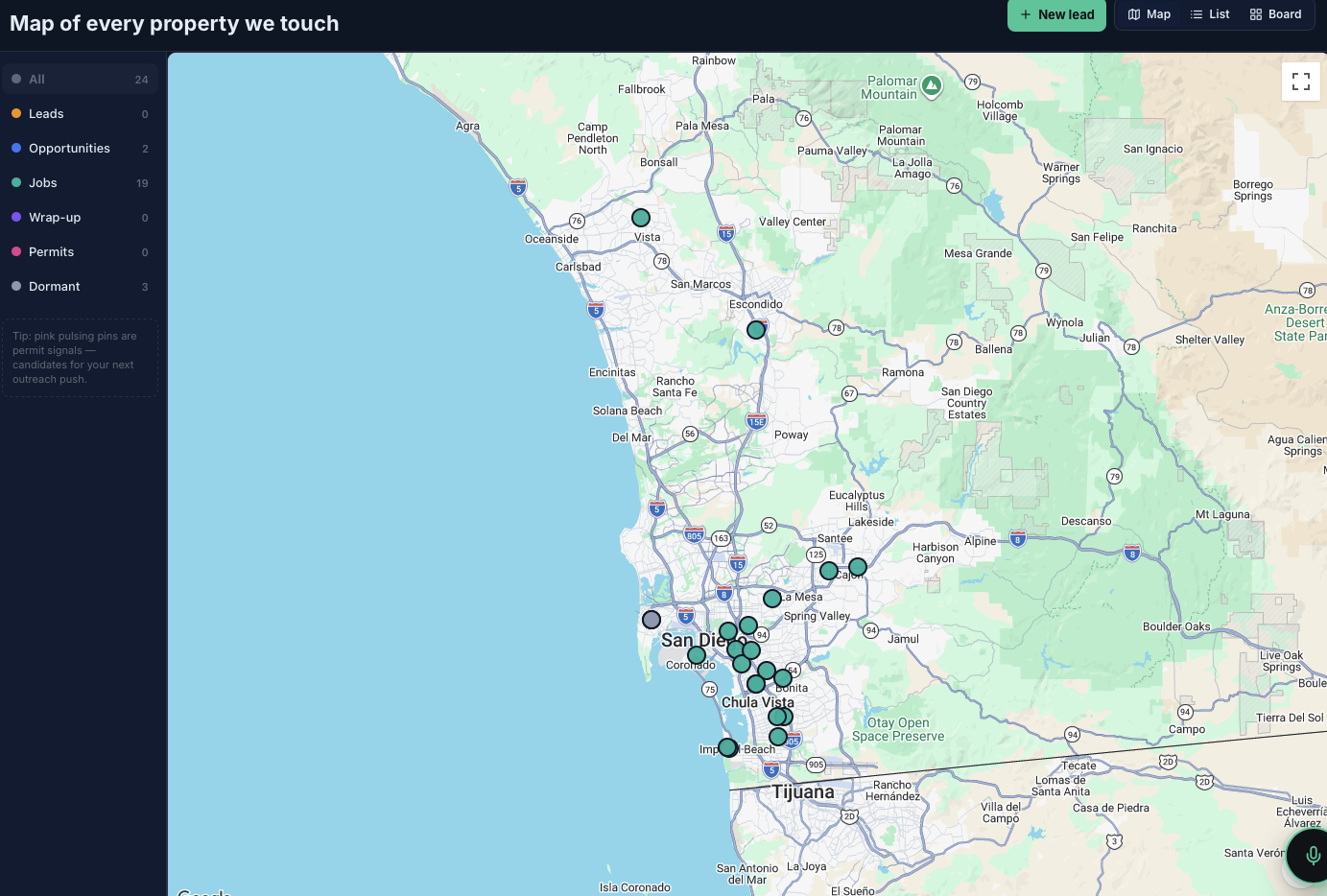
Each contract moves through eight stages, from welcome and onboarding to wrap-up, and each stage brings its own task list. Inside the job, the schedule, daily logs, RFIs and change orders all live on the same record.
Invoices, receipts and lien waivers are generated from the same job, so the numbers never get retyped. Pay applications, bills and purchase orders roll up into budget versus actual.
Crews clock in from their phones, and the time lands on the right job automatically. Homeowners sign in to their own portal and follow the same stage your project manager sees.
Every plan includes everything here except Takeoff Studio and Permit Hunter, which start on Mid.
Nicole is the assistant inside BuildCore for your office and field staff. Type or dictate a question and she answers from your own records.
Ask about open invoices, receivables aging, who is on the clock, this week's schedule or where a change order stands.
Creates tasks and leads, invites vendors to bid, records bids and awards the work, all from a sentence.
Walks through how permitting runs in all 19 San Diego County jurisdictions, and sends code specifics to the building department instead of guessing.
Remodels, ADUs, custom homes and specialty trades. Bring your process. BuildCore takes its shape.
Kitchens, baths and additions with change orders, selections and a client who wants updates.
Design, permits and plan review tracked as real stages, with jurisdiction rules a question away.
Pay applications with retainage, purchase orders and budget versus actual on every job.
Concrete, fence and roofing bid calculators next to the same CRM, scheduling and invoicing.
Every plan includes the core platform. Plans differ by team size, Takeoff Studio and Permit Hunter, and how much setup help you get.
Owner-operators and one-crew contractors
Growing teams running several jobs at once
Builders running multiple crews
BuildCore Ai is in pre-launch. Founding members get 50% off their first 12 months, and nothing is charged until your plan opens. Integrations and custom workflows we add for your company are scoped with you.
Yes. That is the whole idea. We set up your stages, task lists, cost codes, catalogs, templates, markups and roles to match how you run jobs today. When your process changes, your BuildCore changes with it.
Tell us. A report, a form, an approval step or a connection to software you already use. We scope it with you, build it and turn it on for your company. Your BuildCore grows as your company grows.
Yes, we can add it. If your company runs on QuickBooks, we connect it to your BuildCore so invoices, bills and payments sync. It is set up per company, not switched on by default. Until then, job cost and financial reports export to CSV for your bookkeeper.
We add both for companies that want them. E-signature on proposals and change orders, and card or ACH payments on invoices, are set up per company. Without them, clients still see their invoices and change orders in their portal and pay by check, ACH or wire.
BuildCore Ai is in pre-launch and accounts are by invitation. Join the waitlist and we will contact you when your tier opens. Founding members get 50% off their first 12 months, and no card is needed to join.
Yes. BuildCore runs in any modern phone browser, and your crew can add it to their home screen like an app. The time clock, daily logs and photos are built for use on the job site.
Yes. Every client gets their own sign-in to a portal that shows the current stage of the job, plus invoices, change orders, selections and the updates you choose to publish.
Nicole is an assistant inside BuildCore for your office and field staff. She answers questions from your data, creates tasks and leads, and handles vendor bids. She will not quote building code sections. For those she points you to the jurisdiction. She does not take phone calls today. Your team logs calls in the call log, and if you want calling and texting inside BuildCore, we add it for your company.
It reads the plan set, drafts the quantities, prices them and then runs a separate audit pass over its own work. It is built to give your estimator a strong first draft, and nothing goes to a client until someone on your team reviews it and sends it.
Company records are protected by row-level security in the database, so each company only ever sees its own data. Access follows each person's role, client accounts are walled off from internal data, and sensitive changes are written to an audit log.
Join the waitlist and lock in founding-member pricing.